
See your aircraft’s balance the moment it matters
Rynthora CG turns your weighing rig into a live, browser-based balance station. Place your aircraft on the scale and watch its center of gravity and total weight update in real time — with an instant pass/fail check against the limits you set. No app to install, no account to create.
Why center of gravity matters
An aircraft that’s even slightly out of balance handles differently. Nose-heavy, it feels sluggish and reluctant to rotate; tail-heavy, it can turn twitchy and unforgiving. Whether you’re trimming a competition aerobatic model or signing off a UAV before a flight, you want balance confirmed — not guessed. Rynthora CG makes that confirmation fast, repeatable, and visible to everyone at the bench.
A console that runs in your browser
The Rynthora CG console is served straight from your weighing device. Open it on a laptop in the workshop or a phone at the flight line — it’s the same interface, with nothing to install and no sign-up. Connect over your network or directly to the device, and you’re weighing in seconds.
What you can do
Live weighing dashboard
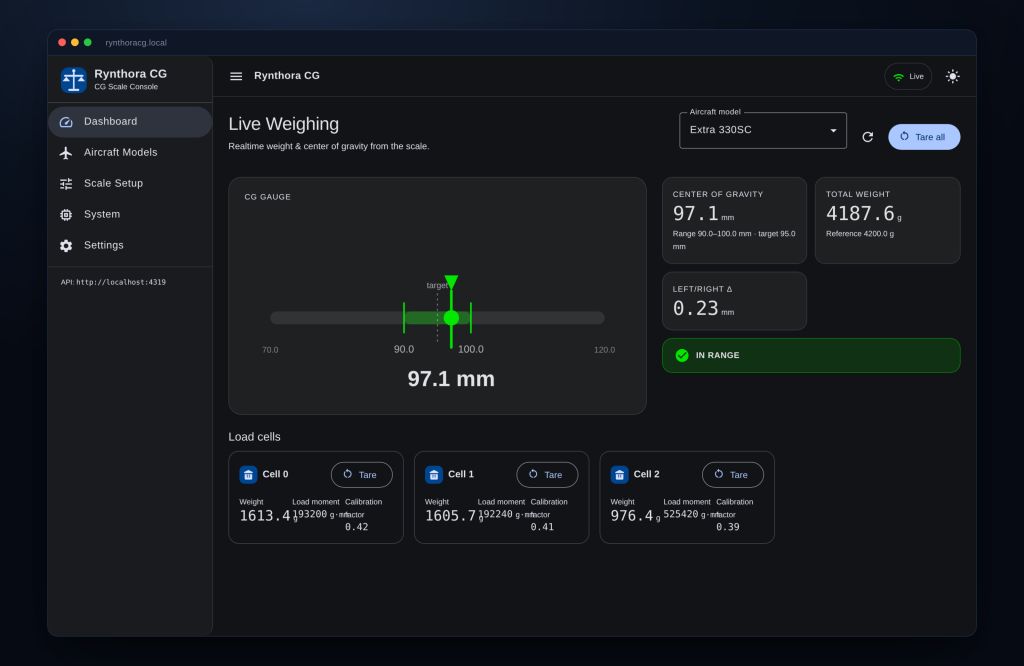
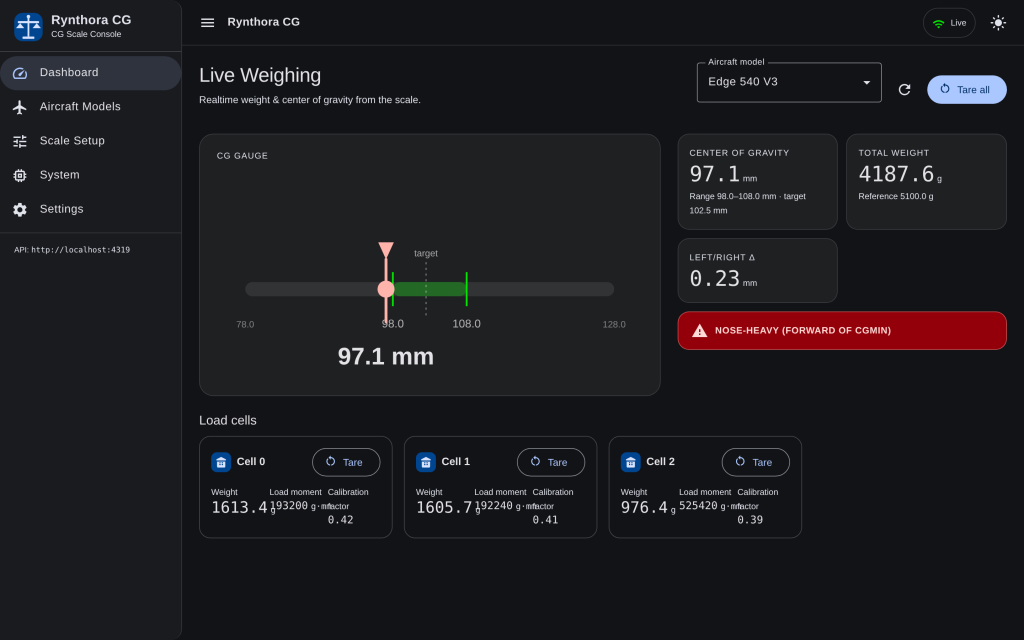
Center of gravity, total weight, and left/right balance stream continuously from the scale. Every load cell shows its own weight, load moment, and calibration factor, so you can see exactly where the mass sits.
Instant pass/fail verdict
Choose an aircraft and the dashboard shows a clear IN RANGE / NOSE-HEAVY / TAIL-HEAVY verdict, with a visual gauge marking the live CG against the allowed envelope and your target. Green means go.
Your aircraft library
Store a CG profile for every airframe — forward and aft limits, target CG, and reference weight. Switch models in a tap and the live check updates instantly. Build it once, reuse it forever.
Guided setup & calibration
Tell the console your scale’s geometry and the spacing between cells, then calibrate each cell with a known mass through a simple, prompted flow. Optional auto-tare on startup means it’s ready when you are.
One-tap tare
Zero a single cell or the whole rig with one tap, right from the dashboard or the setup screen.
System & diagnostics
Check firmware version and battery level, and watch a live message log from the device — calibration progress, tare events, and errors as they happen.
Wi-Fi onboarding
Scan for networks and connect the device to your Wi-Fi from the browser — no cables or terminal, signal strength and all.
Safe over-the-air updates
Push firmware and filesystem updates straight from the browser. Your saved aircraft database is automatically backed up and restored across updates, so your profiles are never lost.
Built for desk and field
A responsive layout that’s as usable on a phone at the flight line as on a workshop monitor, with light and dark themes for any lighting.
Fast and accessible
A lightweight interface that loads quickly and is designed with accessibility in mind — keyboard-friendly and screen-reader aware.
How it works
1. Connect
Open the console in any browser — it’s served from your device over Wi-Fi or a direct connection. Nothing to download.
2. Set up & calibrate
Choose your scale layout, enter the cell spacing, and calibrate each cell with a known weight. Save a profile for each aircraft.
3. Weigh & balance
Place the aircraft, select its profile, and read the live CG and verdict. Adjust, re-tare, and confirm in seconds.
Who it’s for
- Hobby and competition RC pilots who want repeatable, confident balance before every flight.
- Builders and trimmers dialing in a new airframe.
- Clubs and schools sharing one rig across many members and many models.
- UAV and drone teams who need a documented, repeatable CG check as part of pre-flight QA.
Why people choose Rynthora CG
- Confidence, not guesswork. A clear verdict against the limits you define.
- Zero friction. No install and no account — open a browser and go.
- Yours to keep. Aircraft profiles live on the device and survive updates.
- Works where you work. Desk, bench, or flight line; light or dark.
Frequently asked questions
Do I need to install an app?
No. The console runs in any modern web browser and is served directly from your device.
Do I need an internet connection?
No. It works over your local network or a direct connection to the device — there’s no cloud account to set up.
Can I store more than one aircraft?
Yes. Keep a profile for every airframe and switch between them instantly.
Does it work on my phone?
Yes. The interface is fully responsive and designed for use at the flight line as well as the workshop.
Light or dark mode?
Both — switch any time from the toolbar.
What happens to my data when I update the device?
Your aircraft database is automatically backed up and restored during filesystem updates.
Balance with confidence
Set your limits once, then let the console confirm them every time you weigh. Open the dashboard and you’ll know — at a glance — whether you’re ready to fly.